Which Website Builder is Best for Your Small Business?
WordPress, Wix, Squarespace, and More: Which Website Builder is Right for You?
Choosing a website builder can feel deceptively simple.
You compare a few templates, look at the monthly price, and pick whichever platform promises to get your business online fastest.
Then your business changes.
You need to add new services, improve your search visibility, accept payments, connect another system, or make a design change the template does not quite allow. Suddenly, the website builder you chose because it was easy or inexpensive begins to feel limiting.
The best website builder is not necessarily the one with the most features or the lowest starting price. It is the one that fits your current needs while giving you enough room to grow.
Let’s compare six popular options: WordPress, Duda, Wix, Squarespace, Shopify, and GoDaddy.
Before We Compare: What Features Matter?
Most website builder comparisons focus heavily on price. Cost matters, especially for a small business, but it is only one part of the decision.
A useful comparison should also consider:
- How easy is the platform to learn and use?
- How much control do you have over the design?
- What tools does it provide for search engine optimization?
- How much ongoing maintenance does it require?
- Can the website grow as your business changes?
- Will you manage it yourself or work with a professional?
Your answers may point you toward very different platforms.
A Quick Website Builder Comparison
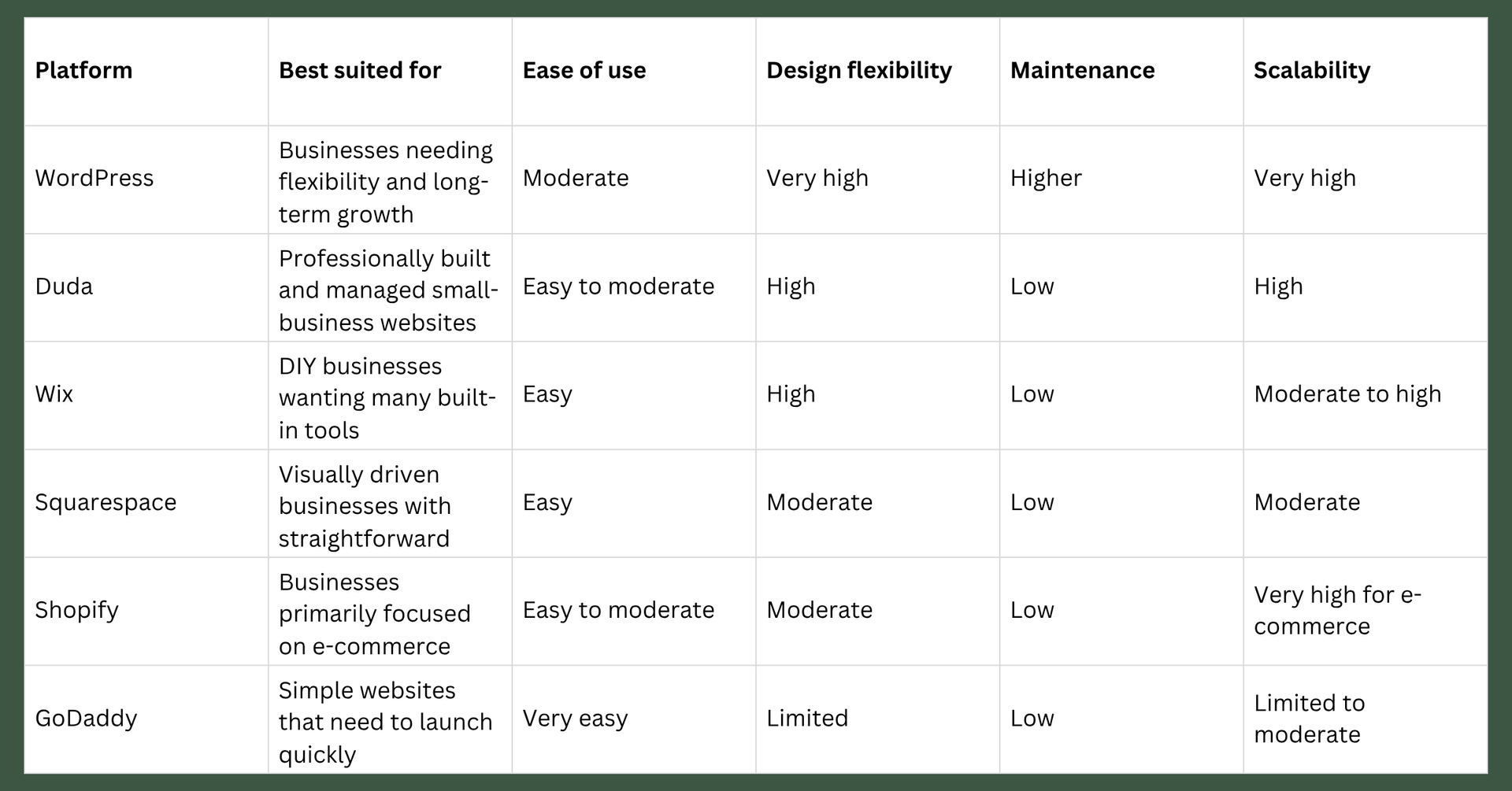
These ratings are not absolute. A professionally configured website will often be easier to manage and more effective than a rushed DIY website, regardless of the platform.
WordPress: The Most Flexible, With More Responsibility
For this comparison, “WordPress” means the open-source software available through WordPress.org and installed through a hosting provider. This is different from WordPress.com, which bundles the software and hosting into a managed subscription.
WordPress is one of the most flexible options available. It can support a basic service-business website, a large publication, an online store, a membership platform, or a highly customized business system.
That flexibility comes from its enormous selection of themes, plugins, integrations, and development options. It also makes WordPress highly scalable. You are less likely to outgrow the platform simply because your business needs a feature that was not originally included.
The tradeoff is maintenance.
A self-hosted WordPress website involves more moving parts, including hosting, software updates, themes, plugins, backups, performance, and security. WordPress allows automatic updates for plugins and themes, but those updates still need to be monitored because changes can occasionally create compatibility problems.
WordPress may be a good choice if:
- You expect your website to grow significantly.
- You need specialized features or integrations.
- You want extensive control over your website and content.
- You are prepared to maintain it or pay someone to manage it.
It may be less suitable if you want a website you can set up quickly and rarely think about afterward.
Duda: A Strong Professionally Managed Option
Duda is designed largely around professionals and agencies building websites for clients. It combines a flexible visual editor with managed hosting, built-in features, team permissions, and client collaboration tools.
At Threadlined Presence, Duda is the platform we primarily use to build websites for our clients. We choose it because it offers a strong balance between professional design flexibility and everyday usability. We can create a website tailored to the business while giving the client an approachable way to make routine updates afterward.
As a Duda agency, we also receive discounted platform pricing that we can pass along to our clients. This allows our clients to benefit from Duda’s managed hosting, security, platform updates, and professional tools at a lower cost than they would typically pay when purchasing an individual plan directly.
Duda offers considerably more design freedom than many simplified DIY builders while reducing the technical maintenance associated with an open-source platform. Hosting, security, and platform updates are managed within the system, so there are fewer separate components for the business owner to monitor and fewer opportunities for conflicting plugins or updates to break something unexpectedly.
Its SEO settings provide control over important page-level elements, including titles, descriptions, URLs, redirects, image alt text, and structured content. As with every platform, having SEO settings available does not mean the website will automatically rank. The site still needs a clear structure, useful content, appropriate keywords, and an ongoing strategy.
Duda may be a good choice if:
- You are working with a website professional.
- You want design flexibility without managing plugins and software updates.
- You want to make basic website updates without navigating an overly technical system.
- Multiple people need different levels of website access.
- You want a platform that can support continued growth without becoming overly complicated.
Duda can be less appealing for someone planning to build entirely on their own, particularly because its pricing and workflow are oriented more toward professionals and agencies. For businesses working with a professional, however, it can provide an effective middle ground between the restrictions of a simple DIY builder and the maintenance demands of a more technically complex platform.
Wix: Flexible and Approachable for DIY Users
Wix is one of the most recognizable do-it-yourself website builders. It provides a visual editing experience, templates, business tools, applications, e-commerce features, and AI-assisted setup.
Wix gives users a great deal of freedom to move and customize elements. That can be empowering, but it can also make it easier to create inconsistent spacing, typography, or mobile layouts if the site is not built carefully.
Its built-in tools can support appointment-based businesses, restaurants, events, online stores, memberships, and other common small-business needs. Wix also includes SEO settings and guidance that make basic optimization approachable for beginners.
Maintenance is relatively low because Wix manages the hosting, security, and core platform. You may still need to maintain your content, integrations, subscriptions, and overall website strategy, but you do not have to update the website software yourself.
Wix may be a good choice if:
- You want to build and manage your own website.
- You need more flexibility than a highly structured template provides.
- You want several business tools within one platform.
- Your needs fit within Wix’s built-in features and app ecosystem.
Its paid plans currently range from basic website plans to substantially more expensive business tiers, so it is important to compare the features you actually need rather than assuming the entry-level price will cover everything.
Squarespace: Polished Design With a Structured System
Squarespace is known for polished templates and a relatively streamlined editing experience. It is especially popular among photographers, artists, consultants, restaurants, event professionals, and other businesses whose websites rely heavily on strong visuals.
Its more structured design system can be a benefit. You have less freedom to accidentally drag elements into awkward positions, and it is often possible to create a cohesive website without extensive design experience.
That same structure can become limiting when a business wants a highly specific layout or functionality outside the platform’s intended system.
Squarespace includes managed hosting, so technical maintenance is relatively low. It also offers blogging, scheduling, selling, memberships, and other business features, although some capabilities depend on your subscription level or an additional service.
Squarespace may be a good choice if:
- You value polished visual presentation.
- Your website has relatively straightforward functionality.
- You want an all-in-one system with limited technical maintenance.
- You are comfortable working within a structured design framework.
Squarespace does not offer an ongoing free plan, although it does offer a trial. Hosting is included in its paid website plans.
Shopify: Build for Selling
Shopify belongs in a slightly different category because it is primarily an e-commerce platform.
While other builders can add online selling, Shopify is built around products, inventory, payments, shipping, discounts, customer accounts, and order management. That makes it one of the strongest choices for a business whose website’s main purpose is selling products.
Shopify is designed to scale from a small online store to a large retail operation. Its app ecosystem can add significant functionality, although paid apps can also increase your monthly costs.
Design customization depends on your theme, editor, and access to development support. A business can launch with a standard theme fairly quickly, but more distinctive or complex storefronts may require professional customization.
Shopify may be a good choice if:
- Selling products is the primary purpose of your website.
- You need inventory, shipping, payment, and order-management tools.
- You expect your online store to grow.
- You want e-commerce infrastructure without maintaining it yourself.
Shopify may be more platform than you need if you primarily provide services and only sell an occasional product. Its standard plans currently begin at $29 per month when billed annually, before payment-processing fees, apps, premium themes, or professional assistance.
GoDaddy: Fast and Simple, With Less Room to Customize
GoDaddy’s website builder focuses on getting a simple website online quickly. Its guided setup and AI tools make it approachable for someone with limited time or technical experience.
For a new or very small business, that simplicity can be valuable. A basic website with your services, contact information, business hours, and a clear next step is far better than having no website at all.
The limitations tend to appear as the business asks more of the site. GoDaddy offers less design flexibility and fewer options for customized functionality than WordPress, Duda, or Wix. A business may eventually need to rebuild elsewhere if its content, SEO strategy, integrations, or customer experience becomes more complex.
GoDaddy may be a good choice if:
- You need a basic online presence quickly.
- Ease of use matters more than customization.
- Your website will remain small and straightforward.
- Your immediate budget is the deciding factor.
GoDaddy advertises introductory website-builder pricing starting at $9.99 per month with an annual term, but renewal pricing and the features included at each level should be reviewed carefully.
What About SEO?
No mainstream website builder automatically guarantees better rankings.
Most established platforms now provide the technical basics needed for SEO, including customizable page titles, meta descriptions, headings, mobile-responsive layouts, image alt text, and connections to analytics and search tools.
The differences lie in how much control the platform gives you and how easily it can support a larger strategy.
WordPress offers the greatest potential flexibility, but that flexibility must be configured and maintained. Duda, Wix, Squarespace, and Shopify handle more of the technical foundation for you. GoDaddy covers the basics but may provide less room for a more advanced strategy.
In practice, your results will depend heavily on:
- Whether your website clearly explains what you offer
- How well it answers the questions your audience is searching for
- The organization of your pages and navigation
- Website speed and usability
- Local search optimization
- Consistent, useful content
- Links and signals from other reputable websites
A well-planned Squarespace or Wix website can outperform a poorly built WordPress website. The platform matters, but what you do with it matters more.
What Does a Website Really Cost?
The subscription or hosting fee is only one part of a website’s cost.
Your total investment may include:
- A domain name
- Hosting or a platform subscription
- Premium themes, templates, plugins, or apps
- E-commerce and payment-processing fees
- Professional design or development
- Maintenance and technical support
- Copywriting, photography, and graphics
- SEO, analytics, and ongoing content
A platform with a lower monthly fee is not always less expensive over time. If it requires complicated workarounds, does not support an important feature, or needs to be rebuilt after a year, the initial savings may disappear quickly.
The reverse is also true. A new business with simple needs may not benefit from paying for a highly customized website before it has established its services, audience, and marketing strategy.
The goal is not to buy the biggest website you can afford. It is to invest in the website that can support the next realistic stage of your business.
So, Which Website Builder Should You Choose?
Here is the short version:
- Choose WordPress when flexibility, ownership, customization, and long-term scalability outweigh the additional maintenance.
- Choose Duda when you want a professionally built, flexible website that is easier to maintain.
- Choose Wix when you want a DIY-friendly platform with a broad range of built-in business tools.
- Choose Squarespace when visual presentation and simplicity matter more than extensive customization.
- Choose Shopify when e-commerce is the central function of your website.
- Choose GoDaddy when you need a simple online presence quickly and do not anticipate complex needs.
If you are still unsure, start with your business rather than the software.
What does the website need to accomplish? Who will update it? What might you want to add over the next two or three years? Which limitations would create a genuine problem?
Those answers will tell you far more than a list of features.
And if you're still unsure, reach out to us any time!
Stay in the Loop!
Follow along on your preferred social platform,
Email questions for future updates,
& Subscribe to our monthly newsletter.